
Download any Calameo flipbook as a PDF file.
Calameo to PDF Downloader is a Chrome extension that automatically scans any Calameo publication page by page and saves it as a high-quality PDF — no screenshots, no manual work, no desktop software required.
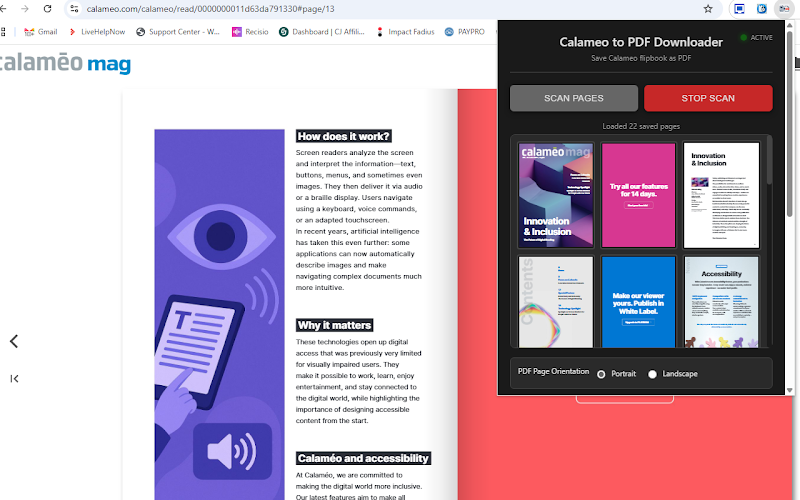
Open any Calameo publication
Navigate to any public Calameo flipbook in Chrome, click the extension icon and start the scan with one click.
Automatic page-by-page scanning
The extension turns pages automatically, captures each one and builds the PDF in the background — no interaction needed.
Save as PDF in one click
When the scan is complete, download the full publication as a single PDF file, ready to read, print or archive.
Everything you need to save a Calameo book
Designed to be simple and reliable — paste the URL, scan, download.
Automatic page turning
The extension navigates through all pages of the Calameo flipbook automatically, without any manual input.
Full PDF export
All scanned pages are compiled into a single PDF file that you can download, print or share easily.
High quality output
Pages are captured at full resolution directly from the Calameo viewer, preserving text and image quality.
Works inside Chrome
No desktop software, no external tools. The extension works entirely in your browser on any Calameo page.
Live scan progress
A real-time progress indicator shows which page is being scanned and how many have been collected so far.
Free and PRO versions
Use the extension for free with basic limits, or unlock the PRO version for unlimited pages and full export capabilities.
See it in action
Watch how Calameo to PDF Downloader scans and exports a complete Calameo publication in just a couple of minutes.
Free version and PRO unlock
The extension is available for free with basic functionality so you can try it before buying. The PRO unlock removes all limits and is ideal for users who need to convert complete publications regularly.
PRO is useful when you need to:
- ✔ Export complete publications with no page limit.
- ✔ Convert long Calameo books and catalogs in full.
- ✔ Use the extension regularly without interruptions.
Get your unlock code
Purchase the official unlock code from OnlineGratis and activate PRO directly inside the extension popup.
Purchase Unlock Code View on Chrome Web StoreWho is it for?
Calameo to PDF Downloader is useful for anyone who regularly reads or archives content published on Calameo — magazines, catalogs, brochures, reports and more.
Save reports and documents published on Calameo for offline reading.
Download competitor catalogs and brochures for analysis.
Archive educational materials and publications before they go offline.
Convert Calameo publications to PDF for printing or sharing internally.
How to use it
- 1Install the extension from the Chrome Web Store.
- 2Open any Calameo flipbook page in Chrome.
- 3Click the Calameo to PDF Downloader icon in the toolbar.
- 4Click Scan and wait for all pages to be captured automatically.
- 5Click Download PDF and save the complete publication to your computer.
Ready to save your first Calameo book?
Install Calameo to PDF Downloader and convert any Calameo publication to PDF in minutes.