
FB Marketplace Scraper
Extract listings from Facebook Marketplace search results and export them to a clean, Excel-compatible CSV file. Capture titles, prices, locations, sellers, URLs and image links directly from your browser.
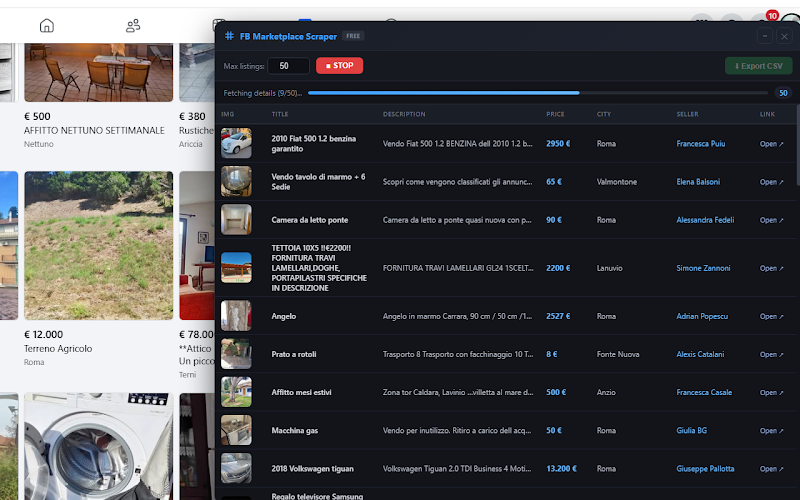
Scan Marketplace search results and capture listing data while you browse.
Video tutorial
Watch how to scan Marketplace search results and export captured listings to CSV.
Extract Marketplace listings into a clean spreadsheet
FB Marketplace Scraper helps you extract listings from Facebook Marketplace search results and export them to a clean, Excel-compatible CSV file in one click.
This lightweight Chrome extension captures listings as you scroll, detects newly loaded items automatically, and organizes the extracted data into a ready-to-use spreadsheet. No manual copy and paste, no complicated setup, and no external server processing.
Best for
- ✓ Resellers and online arbitrage
- ✓ Market research
- ✓ Price comparison
- ✓ Lead generation workflows
- ✓ Local business analysis
Key features
Everything you need to scan, capture and export Marketplace listing data quickly.
Automatic listing scan
Scan Facebook Marketplace pages and capture listings automatically from search results.
Infinite scroll support
New items can be detected as the page loads more listings while you scroll.
Export to CSV
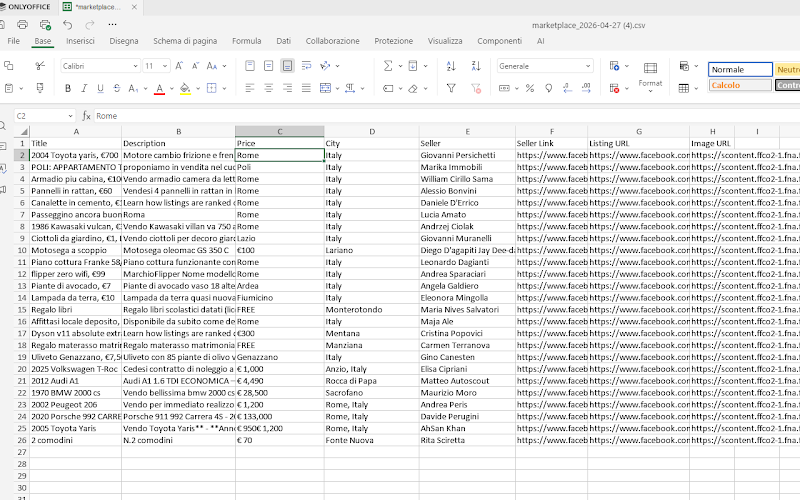
Download a clean Excel-compatible CSV file for Excel, Google Sheets or LibreOffice.
Formatted output
Output is formatted with clean rows and reduced multiline issues.
Fast local extraction
Extract data directly from search results without manual copy and paste.
Local processing
Extracted data stays in your browser and on your device.
Data extracted
From Facebook Marketplace listings, the extension can collect the most useful fields for research, comparison, analysis, and follow-up work.
How it works
Install the extension
Install FB Marketplace Scraper from the Chrome Web Store, then open Facebook Marketplace.
Open a search page
Search for products, categories or local listings. The extension works directly on search result pages.
Click Scan
Click SCAN to collect visible listings. As you scroll and more results load, new items are added automatically.
Export CSV
Click Export CSV and open your spreadsheet in Excel, Google Sheets, LibreOffice or similar tools.
Privacy & local processing
- ✓ Runs locally in your browser — extraction happens on your device
- ✓ No external scraping server — data is not sent away for processing
- ✓ CSV is generated locally — download directly from Chrome
- ✓ Designed for public listings — users decide what pages to scan and export
Usage notice
This extension extracts publicly available data from Facebook Marketplace pages. Users are responsible for ensuring that their use of the extension complies with applicable laws, platform terms, privacy rules, and local regulations.
Turn Marketplace results into a spreadsheet
FB Marketplace Scraper gives you a faster way to collect listing data, compare opportunities and export everything to CSV from your browser.
ℹ️ Disclaimer: Facebook Marketplace is a trademark of Meta Platforms, Inc. This extension is not affiliated with, endorsed by, or sponsored by Meta Platforms, Inc.