Yahoo Finance historical-data tables can be moved into a spreadsheet for charts, calculations, research or further analysis. The goal is to export the rows in a clean format that Excel can open without repetitive copy-and-paste.
1. Data fields
2. CSV export
3. Excel export
4. Date and column filters
5. Common problems
6. FAQ
What Yahoo Finance data can you use in Excel?
A typical historical price table includes Date, Open, High, Low, Close, Adjusted Close and Volume. In Excel you can sort rows, create charts, calculate returns or combine the data with your own analysis.
Export Yahoo Finance data to CSV
CSV is a simple table format supported by Excel, Google Sheets, LibreOffice, Python and R.
- Open the Yahoo Finance quote page for the ticker.
- Go to the historical-data view.
- Choose the period you need.
- Export or capture the rows in CSV format.
- Open the resulting file in Excel.
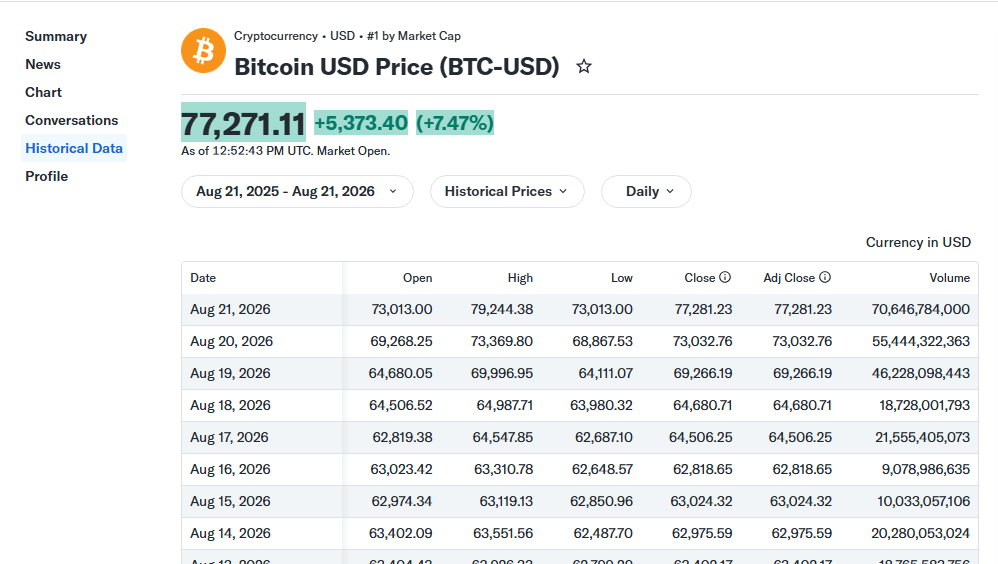
Yahoo Finance historical-data page.
Export directly to an Excel .xlsx file
If you mainly work in Microsoft Excel, an .xlsx file can be more convenient than a plain CSV. The OnlineGratis Yahoo Finance Data to CSV/Excel Exporter reads the historical table, shows a preview and can create either CSV or XLSX output.
Filter dates and columns before exporting
Exporting only what you need keeps the spreadsheet easier to manage. For a simple closing-price chart, Date and Close may be enough; a detailed analysis may also need Open, High, Low, Adjusted Close and Volume.
| Column | Typical use |
|---|---|
| Date | Time axis. |
| Open / High / Low / Close | Daily price movement. |
| Adjusted Close | Historical adjusted-price analysis. |
| Volume | Trading activity. |
CSV or XLSX?
| CSV | XLSX |
|---|---|
| Simple and widely compatible. | Native Excel workbook format. |
| Good for Python, R and data pipelines. | Convenient for Excel-focused workflows. |
Common export problems
The table has not loaded
Wait until the historical-data page finishes loading before exporting.
Excel puts everything in one column
This is usually a delimiter/import issue. Use Excel's data import function and select the delimiter used by the CSV.
I only need a specific period
Set the date range before export when possible.
Frequently asked questions
Can I open Yahoo Finance CSV data in Excel?
Yes. Excel can import standard CSV files.
Can I export only Date and Close?
Yes, when your export workflow supports column selection.
What is the difference between CSV and XLSX?
CSV stores plain table values; XLSX is Microsoft's workbook format and supports richer spreadsheet structure.
Want a faster browser-based export?
OnlineGratis develops Yahoo Finance Data to CSV/Excel Exporter, a dedicated Chrome extension for this workflow.
View Yahoo Finance Data to CSV/Excel Exporter