Save any Perlego book as a PDF in one click.
Perlego to PDF Downloader automatically scrolls through your Perlego books, captures every page and assembles them into a clean, high-quality PDF. Works with both EPUB and PDF viewer books, handles multi-chapter titles automatically and keeps pages at a uniform size.
Open your book on Perlego
Navigate to any EPUB or PDF book on Perlego.com, click the extension icon and press Scan. The extension takes care of everything else.
Automatic multi-chapter capture
When the current chapter ends, the extension automatically clicks "Next chapter" and continues scanning until the entire book is captured — or until you press Stop.
Download a clean PDF
All pages are assembled at a uniform size with consistent margins. Click "Save as PDF" and the file is downloaded directly to your computer.
Everything you need to save Perlego books
A focused tool built for one job: capturing Perlego pages reliably and exporting them as a readable PDF.
Smart auto-scroll
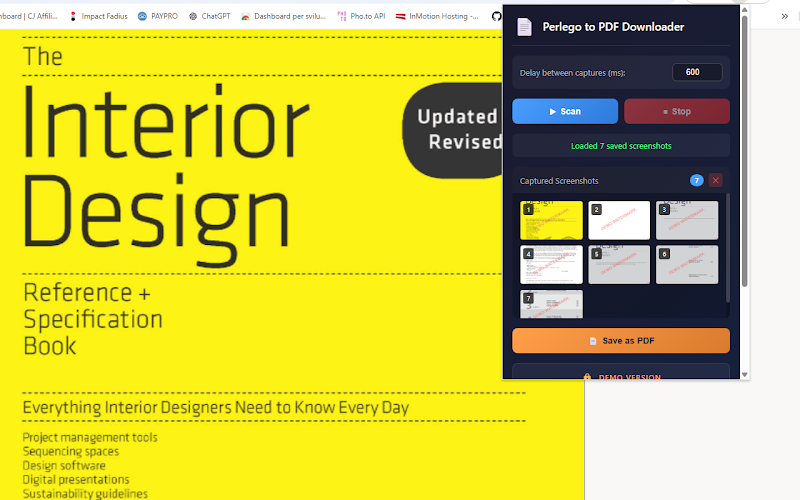
The extension scrolls through the book content automatically, with configurable delay between captures to handle lazy-loading pages.
Uniform page size
Every PDF page has the exact same dimensions and margins, regardless of chapter length or content. No more oddly-sized pages breaking the layout.
EPUB & PDF viewer support
Works with both types of Perlego readers: the EPUB scroll-based viewer and the PDF ReactVirtualized page viewer.
Automatic chapter advance
Detects the "Next chapter" button at the end of each chapter and clicks it automatically, continuing the capture without any manual intervention.
Intelligent line-break detection
Page cuts in the PDF are placed on blank rows between text lines — never in the middle of a sentence or a word.
Free & PRO versions
The free demo version adds a visible watermark to the PDF. Unlock the PRO version with a code to remove it and get unlimited pages.
Simple, focused interface
The extension popup shows live thumbnails as pages are captured, so you can monitor the progress in real time.
Free version and PRO unlock
The extension is fully functional in demo mode. All pages are captured and the PDF is assembled correctly — a visible watermark is the only limitation. Unlock PRO to remove it entirely.
PRO removes all limits:
- ✔ No watermark on exported PDFs.
- ✔ Unlimited pages per capture session.
- ✔ Full multi-chapter book capture without interruptions.
Install the extension
The extension is free to install and use. Enter your unlock code inside the popup to activate the PRO version instantly — no account needed.
Install from Chrome Web Store Purchase Unlock CodeAvailable for Google Chrome and Chromium-based browsers.
Save a book in a few steps
The extension handles the scrolling, page detection and PDF assembly automatically. You only need to open the book and start the scan.
Keep offline copies of textbooks and reference materials.
Archive academic books for annotation and citation.
Save technical manuals and industry reports as PDFs.
Build a personal offline library from your Perlego subscription.
Step-by-step guide
- 1Install the extension from the Chrome Web Store.
- 2Open a book on Perlego.com and navigate to the first page.
- 3Click the Perlego to PDF Downloader icon in your Chrome toolbar.
- 4Press Scan. The extension scrolls through all chapters automatically.
- 5When capture is complete, press Save as PDF to download the file.
Ready to save your Perlego books?
Install Perlego to PDF Downloader and turn any book into a portable PDF in minutes.