
WA Chat Search, Filter & Export
Chrome Extension · WhatsApp Web Search · Smart Filters · CSV Export
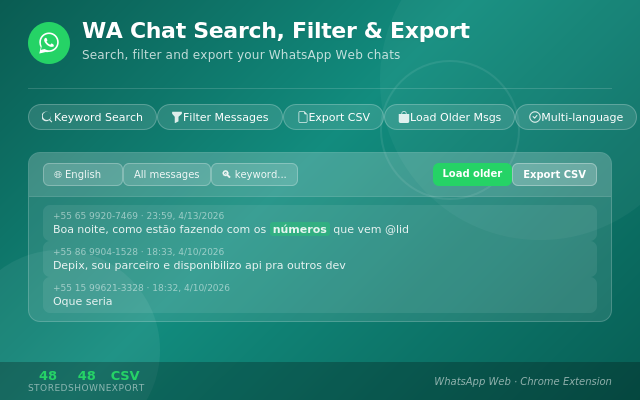
Turn messy WhatsApp Web chats into structured, easy-to-read data. 🔍💬 WA Chat Search, Filter & Export helps you search, filter and export messages from WhatsApp Web so you can quickly find important business information such as prices, products, sizes, quantities and keyword-based messages.
Built for vendors, resellers, small businesses and anyone who uses WhatsApp for work, the extension reads the chat you have open, highlights useful messages in a clean sidebar, and lets you export selected fields to CSV for Excel, Google Sheets or other spreadsheet tools.
⚠️ Note: This extension interacts with WhatsApp Web to search, filter and export messages visible in your own WhatsApp Web session. WA Chat Search, Filter & Export is an independent tool and is not affiliated with, endorsed by, or associated with WhatsApp LLC or Meta Platforms, Inc.
✅ What It Does
- 🔎 Search WhatsApp Web chats — quickly review messages from the conversation you have open
- 🏷️ Smart message filtering — find products, prices, quantities, sizes and custom keywords
- 💬 Clean sidebar interface — view sender, date, extracted data and full message text in one place
- 📊 CSV export — export structured chat data for Excel, Google Sheets and business workflows
- ☑️ Custom export fields — choose exactly which columns to include before saving the CSV file
- 🧾 No duplicate clutter — messages are displayed in a cleaner, easier-to-read format
- ⚡ Fast business review — ideal for product offers, order tracking and vendor group analysis
📖 How to Use
Install the Extension
Click the button below to install WA Chat Search, Filter & Export from the Chrome Web Store. Once installed, open WhatsApp Web and choose the chat you want to analyze.
Open WhatsApp Web and Read the Chat
Open web.whatsapp.com, select an individual or group conversation, click the extension icon, then click “Read Chat”. The extension will organize useful messages in a clean sidebar so you can filter and review them faster.
Filter Messages and Export to CSV
Search by product, price, quantity, size or any custom keyword. When you are ready, click Export CSV, select the fields you want to include, and open the file in Excel, Google Sheets or your favorite spreadsheet tool.
Smart Filters & Export Fields
Choose what to detect, review and export from your WhatsApp Web business conversations:
👥 Perfect For
- ▸ Vendors and resellers — quickly find product offers, prices and quantities in busy chats
- ▸ Small businesses — turn daily WhatsApp messages into organized CSV data
- ▸ Order tracking workflows — review order-related messages without scrolling endlessly
- ▸ Vendor groups — filter group messages by keywords, products, sizes and prices
- ▸ Anyone using WhatsApp for work — save time when reviewing and exporting important messages
Privacy-Friendly Workflow
- ✓ No account required — works directly from your Chrome browser
- ✓ Local chat processing — reads the WhatsApp Web chat open in your own session
- ✓ CSV export to your device — save structured data locally for spreadsheets
- ✓ Focused permissions — designed for WhatsApp Web chat search, filtering and export
Stop wasting time scrolling through long WhatsApp Web conversations. WA Chat Search, Filter & Export helps you find products, prices, quantities, sizes and keyword-based messages, then export structured data to CSV. Simple, fast, and built for business chats. 🚀
⬇️ Install Free from Chrome Web Store