
WA Media Saver
Chrome Extension · WhatsApp Web Media Downloader · Photos · Videos · Audio · Documents
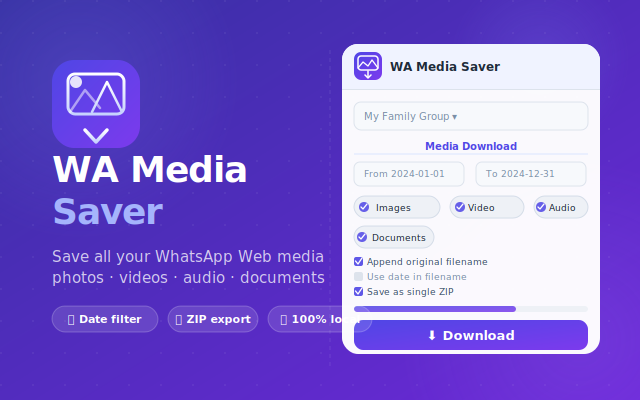
Save photos, videos, audio messages and documents from your WhatsApp Web conversations directly to your computer. 🖼️💾 WA Media Saver helps you browse and download media files from individual or group chats without opening every file one by one.
Built for anyone who needs to archive or organize WhatsApp Web media, the extension lets you choose media types, preview chat statistics, save files as a ZIP archive or individual downloads, and keep everything local on your device.
⚠️ Note: This extension interacts with WhatsApp Web to save media files that are already visible or available in your own WhatsApp Web session. WA Media Saver is an independent tool and is not affiliated with, endorsed by, or associated with WhatsApp LLC or Meta Platforms, Inc. WhatsApp® is a registered trademark of WhatsApp LLC.
✅ What It Does
- 🖼️ Save photos and images — download pictures from WhatsApp Web conversations to your computer
- 🎬 Save videos — collect video files from individual or group chats
- 🎙️ Save audio and voice messages — export voice notes and audio clips when available in WhatsApp Web
- 📄 Save documents and files — download PDFs, DOCX files and other shared attachments
- 📦 ZIP or individual downloads — save everything as one archive or download files separately
- 📅 Date range filtering — PRO users can set From / To dates to retrieve only the files they need
- 🔎 Deep Scan and chat statistics — scan long conversations and preview how many media files are available before downloading
📖 How to Use
Install the Extension
Click the button below to install WA Media Saver from the Chrome Web Store. Once installed, open WhatsApp Web and choose the conversation that contains the photos, videos, audio files or documents you want to save.
Open WhatsApp Web and Select a Chat
Open web.whatsapp.com, select an individual or group conversation, then click the WA Media Saver icon in your Chrome toolbar. The extension can show chat statistics so you can see how many images, videos, audio files and documents are available before downloading.
Choose Media Types and Download
Choose which media types to include — images, videos, audio or documents — then click Download. You can save files as a single ZIP archive or as individual downloads in your Chrome Downloads folder. PRO users can also filter by date range.
Media Types & Download Options
Choose exactly what to save from your WhatsApp Web conversations:
👥 Perfect For
- ▸ Personal backups — save important photos, videos and documents from your own chats
- ▸ Small businesses — archive customer files, product photos, voice notes and shared documents
- ▸ Group chat organization — collect media from busy conversations without downloading one file at a time
- ▸ Long conversations — use Deep Scan mode to retrieve older media from extended chat histories
- ▸ Anyone using WhatsApp Web — save time when organizing media files on a computer
Privacy-Friendly Local Downloads
- ✓ No account required — works directly from your Chrome browser
- ✓ 100% local workflow — files are saved from WhatsApp Web to your device
- ✓ No third-party servers — your WhatsApp media is not uploaded elsewhere
- ✓ Focused permissions — access to web.whatsapp.com and downloads permission to save files locally
Stop downloading WhatsApp Web media one file at a time. WA Media Saver helps you save photos, videos, audio messages and documents from your chats directly to your computer, with ZIP download, media filters, Deep Scan and privacy-friendly local processing. 🚀
⬇️ Install Free from Chrome Web Store | PURCHASE UNLOCK CODE