Download entire websites from the Wayback Machine.
Wayback Site Downloader recovers complete websites archived on web.archive.org. Paste a Wayback URL or a domain, scan the archive, and download every page and file with the original folder and subfolder structure rebuilt inside your Downloads folder. Perfect for restoring an old website, preserving content or researching the web of the past.
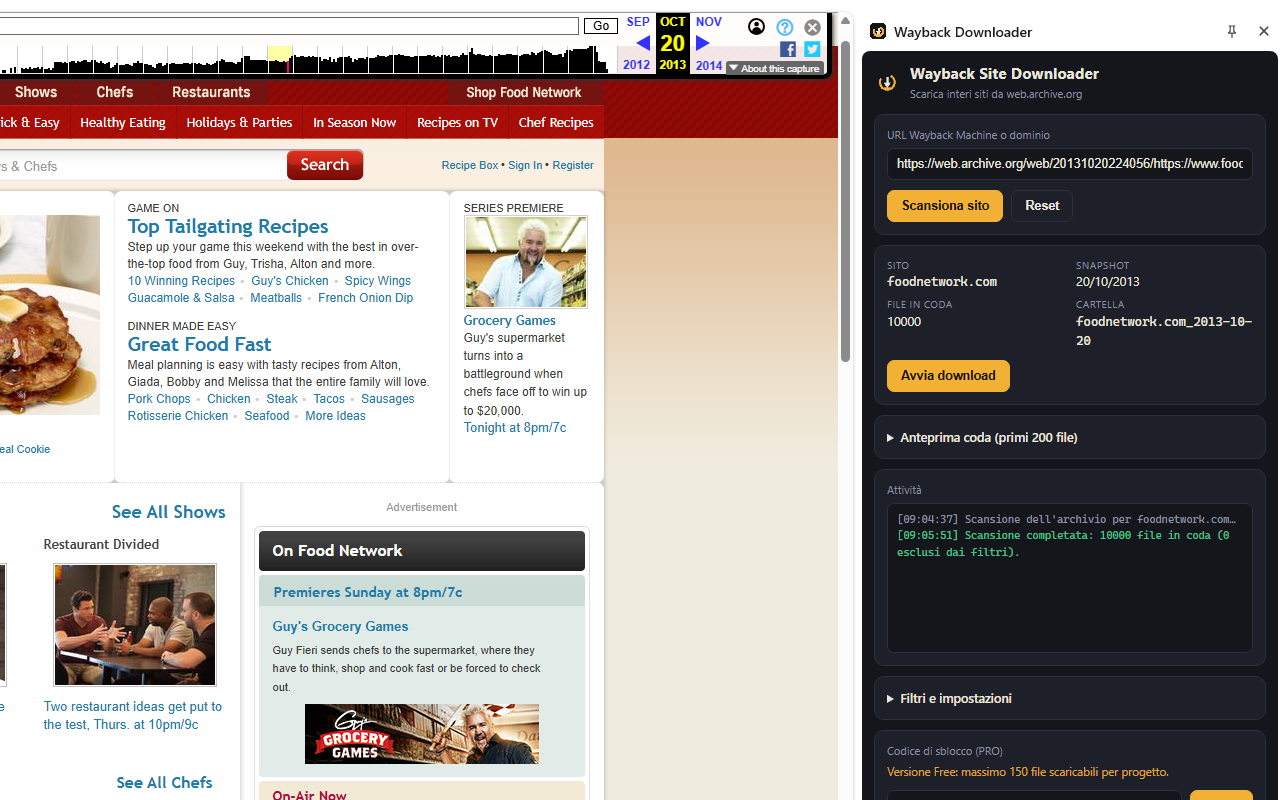
Watch Wayback Site Downloader in action
See how the extension scans a Wayback Machine archive, prepares the download queue and saves archived website files with the original folder structure.
Prefer a dedicated page? Open the full tutorial with video metadata and step-by-step notes.
Open Video Tutorial PagePick a moment in time
Paste any Wayback Machine URL with a snapshot date and download the website exactly as it was on that day, without later versions.
Scan the whole archive
One click queries the official archive.org CDX API and queues every unique page, image, stylesheet and file of the site — no page-by-page crawling.
Original folder structure
Everything is saved to Downloads/sitename_date/ with the site's original folders and subfolders faithfully rebuilt, ready to browse offline.
A professional archive downloader in your side panel
The extension works in two steps: Scan, which analyzes the Wayback Machine archive and builds the download queue, and Download, a robust engine with filters, pause/resume and automatic retries.
Archive Scanner
Enter a Wayback Machine URL (e.g. https://web.archive.org/web/2008.../mysite.com) or just a domain, then click Scan.
- ✔ Full site scan through the official archive.org CDX API — fast even on sites with thousands of pages.
- ✔ Snapshot precision: downloads the version of each file closest to your chosen date, never newer ones.
- ✔ Or grab the latest available version of the whole site by entering just the domain.
- ✔ Smart deduplication: http/https/www and port variants of the same page become a single file.
- ✔ Ignores tracking URL parameters (utm_, fbclid, gclid and a customizable list) to avoid duplicate pages.
- ✔ Optional subdomains (forum.site.com, shop.site.com) saved in their own subfolders.
- ✔ Fast-scan mode for huge websites, paginated scanning and automatic retries on archive.org server errors.
- ✔ Live progress in the activity log, queue preview and a Stop button to interrupt the scan at any time.
Download Engine & Filters
Review the queue, adjust the filters and start downloading. Everything is saved with the original site structure.
- ✔ Files saved to Downloads/sitename_date/ with the original folder and subfolder tree.
- ✔ Clean original files, without the Wayback Machine toolbar injected in pages.
- ✔ Exclude file extensions (exe, zip, iso…) or download only the types you need (html, jpg, pdf…).
- ✔ Limit by file size, number of files, HTTP status 200 only, or exclude URLs with querystrings.
- ✔ Configurable simultaneous downloads (1–8) with anti-blocking delay between files.
- ✔ Pause, resume and cancel at any time; failed files can be retried with one click.
- ✔ Automatic 30-second backoff when archive.org rate limits are detected.
- ✔ Real-time counters: completed, queued, active and failed files with a visual progress bar.
- ✔ Available in 8 languages: English, Italian, Spanish, French, German, Portuguese and Chinese.
Clean side panel interface
The extension lives in the Chrome side panel: always visible while you browse, with the scan queue, filters and download progress at a glance.
Free version and PRO unlock
The free version lets you scan any website and download up to 150 files per project — plenty for small sites and for testing. The PRO unlock removes every limit and is designed for full archive recovery work.
PRO is useful when you need to:
- ✔ Download complete websites with hundreds or thousands of pages.
- ✔ Recover a full site without the 150-file interruption.
- ✔ Use the extension for recurring archiving, research or site-recovery projects.
Get your unlock code
Purchase the official unlock code from OnlineGratis and activate PRO directly inside the extension side panel. When the free limit is reached the download simply pauses: activate the code, press Resume and it completes the remaining files.
Purchase Unlock Code View on Chrome Web StoreWho is it for?
Wayback Site Downloader is useful whenever a website only exists — or only exists in the version you need — inside the Internet Archive.
Recover your old site after a hosting loss, an expired domain or a failed migration.
Preserve archived pages and study how websites changed over the years.
Retrieve old layouts, graphics and content as reference for redesigns.
Build offline copies of historical websites before they disappear from the web.
How to use it
- 1Install the extension from the Chrome Web Store and click its icon to open the side panel.
- 2Paste a Wayback Machine URL with the snapshot date, or just type the domain for the latest version.
- 3Click Scan site: the archive is analyzed and all unique files are queued.
- 4Adjust the filters: excluded extensions, file types, size limits, subdomains and more.
- 5Click Start download and find the whole site in Downloads/sitename_date/ with its original folders.
Ready to bring a website back from the past?
Install Wayback Site Downloader and turn the Internet Archive into a one-click site recovery tool.