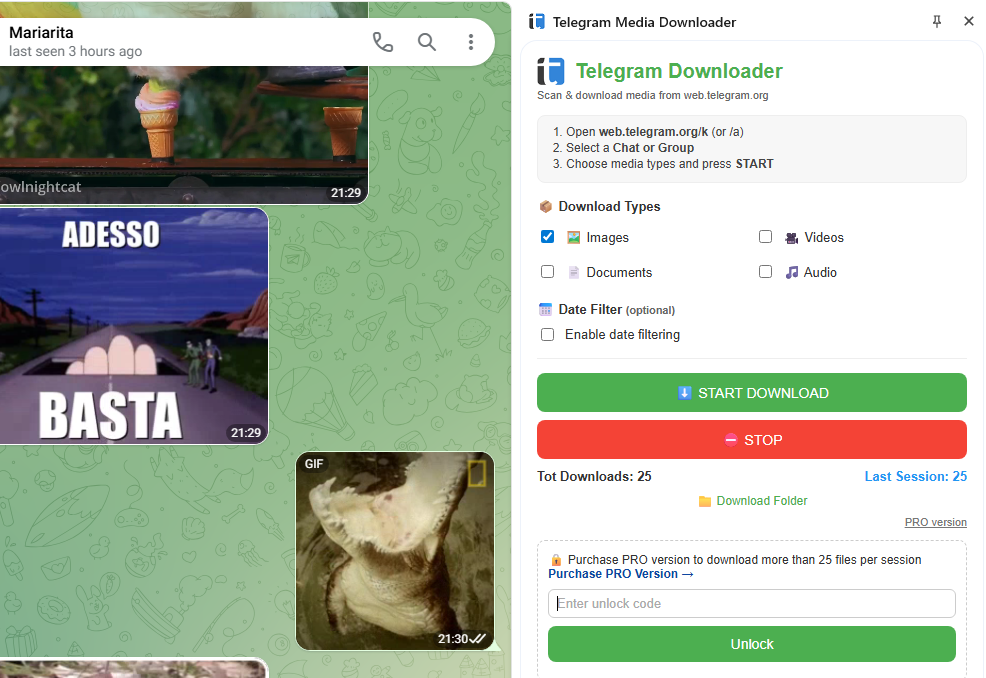
Save and export images, videos, documents and audio from any Telegram Web chat, group or channel — with media type filters, date range picker, and a convenient side panel interface.
Telegram Media Downloader helps you collect files from the Telegram Web chat you are currently viewing. It scans visible and older messages while scrolling through the conversation and lets you save the media you need without repeating the same manual steps for every item.
Stop opening every file manually. The extension automatically detects every image, video, document and audio file in the active Telegram Web conversation and downloads them all in one go — with media type filters and a powerful date range picker so you get exactly what you need.
The side panel interface lets you keep Telegram Web fully visible while the downloader runs alongside it. Set your filters, choose a date range for targeted exports, and click Start — the extension takes care of the rest. Works on personal chats, work groups, public channels, and archived conversations.
Designed to save you time — powerful features, simple interface.
Download images, videos, documents and audio files — choose any combination before starting.
Limit the scan to a specific time period — download only files sent between two chosen dates.
Use the extension from a Chrome side panel while Telegram Web stays fully visible alongside.
Works on personal chats, work groups, public channels, archives and media-heavy conversations.
Supports both modern Telegram Web interfaces available at web.telegram.org.
Works with your existing Telegram Web session — no third-party accounts needed.
Watch the full walkthrough to get started in minutes.
No technical skills required — just install and go.
Clean, intuitive interface that works right inside your browser.
Quick answers about how the extension works.
Does it work with Telegram Web?
Yes. The extension is designed specifically for Telegram Web and supports both the modern Telegram Web A and K interfaces available at web.telegram.org.
Can I download only images or only videos?
Yes. You can choose the media types you want before starting the download — images, videos, documents, audio, or any combination.
Can I download files from a specific time period?
Yes. The date range filter lets you set a start and end date, so you only scan and download media from the period you need.
Does it download documents and audio?
Yes. Besides images and videos, the extension can detect and download documents and audio files when those categories are selected in the filter.
Is there a free version?
Yes. The extension includes a free mode with a download cap. An unlock code is available for users who need higher download limits.