
YouTube No Auto Translation
Chrome Extension · Original Audio · Original Titles · Original Descriptions
Want to keep YouTube in the original language?
Learn the difference between translated titles, descriptions, dubbed audio and subtitles, and how YouTube No Auto Translation restores the creator's original content.
Read the guide →Tired of YouTube automatically translating video titles, descriptions, and switching audio to dubbed versions? 🎬 YouTube No Auto Translation restores the original experience: original titles, original descriptions, original audio track — always, on every page.
Perfect for language learners, content creators, international viewers, and anyone who wants to watch YouTube without forced translations. The extension works silently in the background, ensuring you always see content as the creator intended it to be seen.
⚠️ Note: This extension modifies YouTube's behavior to prevent automatic translation features. It does not affect manually selected subtitles or your ability to choose translated content when desired.
✅ What It Does
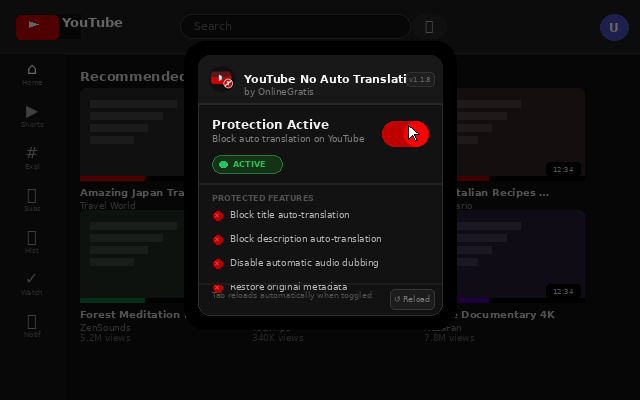
- 🚫 Blocks auto-translated titles on video pages, search results, homepage and suggestions
- 🚫 Blocks auto-translated descriptions — see the original text as the creator wrote it
- 🔊 Disables automatic audio dubbing — forces the original audio track
- 🔄 Restores original metadata on all YouTube layouts
- 📺 Works everywhere: /watch, /shorts, /live, search, channels, playlists and home feed
- ⚡ Zero configuration needed — protection is ON by default after installation
- 🔘 Easy toggle — disable from popup if you want to temporarily suspend protection
📖 How to Use
Install the Extension
Click the button below to install YouTube No Auto Translation from the Chrome Web Store. The installation takes just a few seconds and protection is automatically enabled — no setup required!
Open YouTube — Enjoy Original Content
Simply open YouTube and browse as usual. All video titles, descriptions, and audio tracks will now appear in their original language — exactly as the content creator intended. No more awkward machine translations or unwanted dubbed audio!
Toggle Protection (Optional)
Need to temporarily see translated content? Simply click on the extension icon in your Chrome toolbar and use the toggle to disable protection. Click again to re-enable it. The page will automatically reload to apply your preference.
👥 Perfect For
- ▸ Language learners — watch content in the original language for better immersion
- ▸ Content creators — see how your videos appear to international audiences
- ▸ International viewers — enjoy content without awkward machine translations
- ▸ Subtitle users — read original titles while using your preferred subtitle language
- ▸ Anyone who prefers authentic content over auto-translated versions
Privacy Guaranteed
- ✓ No data collection — we don't track anything
- ✓ No external servers — everything runs locally
- ✓ Works entirely in your browser — no network requests
- ✓ Only requires access to youtube.com — minimal permissions
Take back control of your YouTube experience. YouTube No Auto Translation ensures you always see content in its original form — the way creators intended it to be seen. No more frustrating auto-translations, no more unwanted dubbed audio. Just authentic content, every time. 🎬
⬇️ Install Free from Chrome Web Store